2019年3月20日 星期三

移轉實體主機至Hyper-V的虛擬機器(簡稱P2V)


在 Windows 10 上安裝 Hyper-V

透過設定啟用 Hyper-V 角色

  1. 以滑鼠右鍵按一下 Windows 鍵,然後選取 [應用程式與功能]。
  2. 選取 [程式和功能在相關的設定下,右側。
  3. 選取 [開啟或關閉 Windows 功能]。
  4. 選取 [Hyper-V],然後按一下 [確定]。
Windows 程式和功能對話方塊
安裝完成後,系統會提示您重新開機電腦。

Microsoft Virtual Machine Converter 3.0
https://www.microsoft.com/en-us/download/details.aspx?id=42497

Supported Operating System
Windows Server 2008 R2 SP1, Windows Server 2012, Windows Server 2012 R2

Before you install Microsoft Virtual Machine Converter (MVMC), you must install the following software on the computer on which you want to run MVMC:
  • Windows Server 2012 R2, Windows Server 2012, or Windows Server 2008 R2 SP1 operating systems
  • Microsoft .NET Framework 3.5 and .NET Framework 4 if you install MVMC on Windows Server 2008 R2 SP1
  • Microsoft .NET Framework 4.5 if you install MVMC on Windows Server 2012 or Windows 8.
  • Note Although MVMC installs on all of these versions, using the Windows PowerShell cmdlets that are released as part of MVMC requires Windows PowerShell Runtime 3.0, and the cmdlets function only on Windows Server 2012 R2, Windows Server 2012, Windows 8.1, or Windows 8.
  • Install Feature Bits Compact server
  • Visual C++ Redistributable for Visual Studio 2012 Update 1


2019年3月18日 星期一

Oracle Database - ORA-01017: invalid username/password; logon denied

ORA-01017: invalid username/password; logon denied

常見時機:
1. 帳號密碼敲錯

.....咦,好像不值得這篇。   主要是下面這個時機。


2. 遠端sysdba登錄,但 資料庫參數 remote_login_passwordfile = NONE


  • shared
    一個或多個數據庫可以使用密碼文件。密碼文件既可以包含SYS非SYS用戶,也可以包含非用戶。
  • exclusive
    密碼文件只能由一個數據庫使用。密碼文件既可以包含SYS非SYS用戶,也可以包含非用戶。
  • none
    Oracle忽略任何密碼文件。因此,必須由操作系統對特權用戶進行身份驗證。

位置:
[oracle@testdb1 db_1]$ cd $ORACLE_HOME/dbs

[oracle@testdb1 dbs]$ ll orapworcl
-rw-r----- 1 oracle oinstall 1536 Apr 26  2017 orapworcl


Command:
SQL> show parameter pass

NAME                                 TYPE        VALUE
------------------------------------ ----------- ------------------------------
remote_login_passwordfile            string      EXCLUSIVE
SQL>
SQL>
SQL> select * from v$pwfile_users;

USERNAME                       SYSDB SYSOP SYSAS
------------------------------ ----- ----- -----
SYS                            TRUE  TRUE  FALSE

SQL> grant sysdba to hr2;

Grant succeeded.

SQL> select * from v$pwfile_users;

USERNAME                       SYSDB SYSOP SYSAS
------------------------------ ----- ----- -----
SYS                            TRUE  TRUE  FALSE
HR2                            TRUE  FALSE FALSE

2019年1月19日 星期六

Troubleshoot - 2018-11 適用於 x64 系統 Windows 10 Version 1803 的更新 (KB4023057) - 錯誤 0x80070643


Windows 10 Version 1803 執行Windows Update 出現錯誤

更新 (KB4023057) - 錯誤 0x80070643


試了兩個方式無效
1. Windows 問題疑難排解 (Troubleshoot)
2. Dism


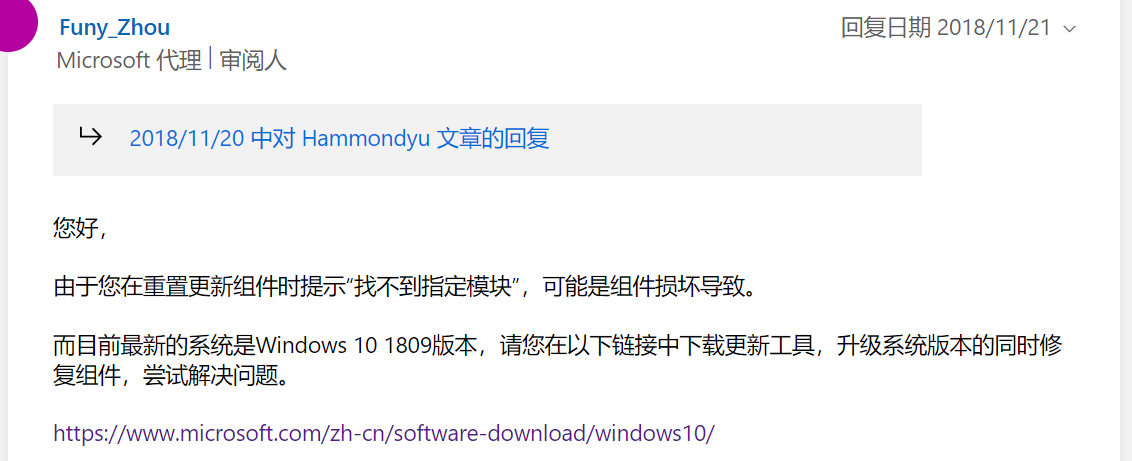
最後找到簡單的方式解決,直接更新到 Windows 10 Version 1803 即可

https://answers.microsoft.com/zh-hans/windows/forum/all/2018-%E9%80%82%E7%94%A8%E4%BA%8E-windows-10/241f4af0-d8fa-46cb-b5f9-0d0fb71410ba


檢查適用性與下載網址  https://www.microsoft.com/zh-tw/software-download/windows10/


2019年1月15日 星期二

TPAM - request申請單的生命週期與簽核


TPAM 中的申請單會有一個屬性,稱為狀態(Status)。從申請開始到使用結束,生命週期中有下方這些狀態。

  • Pending Approval - waiting for authorized approver/s to approve the request.
  • Active/Approved - the request has been approved and is within the release duration window.
  • Approved - the request has been approved but the request date/time is in the future.
  • Denied - the request was denied by the approver/s.
  • Canceled - the submitted request conflicts with a request that has already been approved for the same time period or the requestor decides to cancel the request prior to accessing the password. The request will also be cancelled if the ticket number entered on the request requires validation, and fails.
  • Expired - the release window for the password has passed or the requestor is done accessing the password and expires the request early.
  • Extended - the release has been extended past the original requested duration.

當申請者提出request,核准者會收到郵件通知。點選下方的URL Link即可登入系統簽核該張申請單。


當表單已經被簽核過,表單狀態變更了,再次點擊URL Link進入TPAM系統,會發生什麼狀況?  以下做個小測試:

Pending Approval


Approved


Expired


Denied


當一張Request申請單,還沒有結束他的生命週期,卻遇到了權限變更,有時候直接點選URL進行簽核會遇到問題,如下方幾個貼圖。這時候回到TPAM登入後的首頁,點選Pending Approval進行表單簽核即可。

Firefox:


 IE:


2019年1月7日 星期一

Active Roles - 新增使用者時 自動給預設密碼

在使用ARS Web介面,新增使用者時,可以用OU為單位,來設定 '

  1. Password Policy
  2. 自動帶入預設密碼
這樣可以節省時間,增加效率。設定方式如下:

設定密碼的default value

選擇要套用的OU


2019年1月4日 星期五

TPAM - 新增群組成員時發現都是反白的無法點選變更

以下兩個情境,各有不同的Group and UserID 管理方式。

1. 群組與UserID是從LDAP帶過來的,這種方式無法透過TPAM修改群組成員(反白)。須在AD新增成員到OU,TPAM會透過Auto Discovery 做sync。


2. 如果是在TPAM手動建立的Group,則可以增加Local Useror LDAP User到此Group。


2019年1月2日 星期三

Upgrade Oracle DBA OCP 10g to 12c R2 ..... Certification Paths

1Z0-060   Oracle 10g OCP --> Oracle 12c OCP 

https://education.oracle.com/upgrade-to-oracle-database-12c/pexam_1Z0-060

Recommended Training

  • Oracle Database 12c R1: New Features for Administrators Ed 2

Additional Preparation and Information

Practice Exams: Oracle Authorized practice exam from Kaplan IT Training: 1Z0-060 Upgrade to 12c - New Features of Oracle Database 12c
https://www.kaplanittraining.com/certification/oracle/1z0-060


1Z0-074   Oracle 12c OCP --> Oracle 12c R2 OCP

Recommended Training

  • Oracle Database 12c R2: New Features for 12c R1 Administrators Ed 1
    • Training On Demand Train online via an Internet connection, 24/7. NT$55,575.00 90 Days (Oracle University)
    • Live Virtual Class Attend live classes in real-time from anywhere with an internet connection. 5 Events5 Days (Oracle University)
  • Oracle Database 12c R1: New Features for Administrators Ed 2

Additional Preparation and Information

Practice Exams: Oracle Authorized practice exam from Kaplan IT Training: 1Z0-074    Upgrade Oracle DBA 11g or 12c to 12c R2 (OCP)


Oracle Database 12c R2: New Features for Administrators Part 1 Ed 1
https://education.oracle.com/oracle-database-12c-r2-new-features-for-administrators-part-1-ed-1/courP_7999

  • Oracle 12cR2資料庫之新功能介紹-DBA篇Part 1  台北 19503 班 2019/04/08 ~ 2019/04/12 每週一二三四五 09:00~16:30  (恆逸)

Oracle Database 12c R2: New Features for Administrators Part 2